Mastering Pandas Set Index Techniques for Efficient Data Management
Data scientists and analysts often find themselves grappling with large datasets requiring efficient handling and manipulation. One of the fundamental techniques to streamline these tasks is leveraging Pandas’ set index methods. By setting an appropriate index, data can be managed more effectively, facilitating operations such as sorting, filtering, and transforming. This article aims to provide a focused expert perspective on Pandas set index techniques to enhance data management.
Key Insights
- Setting an index can significantly optimize data manipulation tasks in Pandas.
- Understanding the impact of different index types on performance is critical for efficient data handling.
- Practical recommendations include always confirming the necessity of index changes before application.
The Significance of Indexing in Data Frames
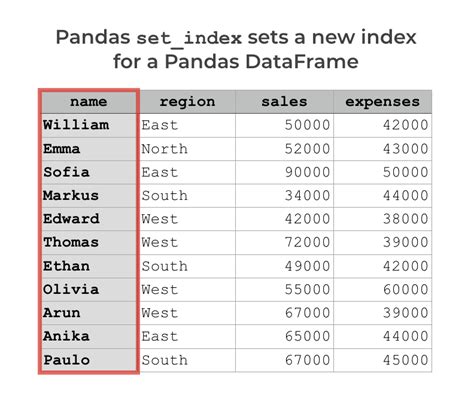
Setting an index in a Pandas DataFrame can redefine how data is accessed and manipulated. An index acts as a primary reference to retrieve, sort, and filter data. When properly set, the dataset’s performance in various operations can be dramatically improved. For instance, consider a dataset where time series data is abundant. By setting the time column as the index, time-based queries and sorting operations become significantly faster, optimizing tasks such as trend analysis and anomaly detection.Advanced Techniques for Index Selection
When choosing an index, it is essential to consider the nature and structure of the dataset. For time series data, using Pandas’ built-in datetime indexing is beneficial. This allows for straightforward time-based operations. Here’s an example:```python import pandas as pd data = {'date': ['2023-01-01', '2023-01-02', '2023-01-03'], 'value': [10, 20, 30]} df = pd.DataFrame(data) df['date'] = pd.to_datetime(df['date']) df.set_index('date', inplace=True) ```.
This simple adjustment transforms the DataFrame into a more efficient structure for temporal data analysis. Additionally, hierarchical indexing, also known as multi-indexing, offers enhanced flexibility and complexity in data organization. For example, multi-indexing is useful in scenarios with nested categorical data:
```python df_multi = df.set_index(['category','sub_category']) ```.
Performance Considerations and Best Practices
Setting an index is not just about enhancing the data structure; it’s also about managing performance wisely. One technical consideration is the size of the dataset. For extremely large datasets, the overhead of setting an index can be significant. Therefore, always perform a benchmark to understand the trade-off between the benefits of an optimized index and the computational cost.An actionable recommendation is to use the inplace=True parameter when setting an index. This can save memory by avoiding the creation of an intermediary DataFrame. Additionally, ensure that the selected index column has a unique value to avoid any ambiguity during data retrieval.
What is the impact of setting a multi-level index?
Setting a multi-level index allows for more granular data segmentation, facilitating complex queries and more nuanced data analysis. However, it can also increase complexity and should be applied thoughtfully.
Should I always set an index for my dataset?
No, it's not always necessary. Setting an index should be reserved for datasets where performance gains are evident. Always assess the dataset's characteristics and the specific tasks it will be used for before deciding to set an index.
Effectively mastering Pandas set index techniques can lead to significant improvements in data management, providing both speed and flexibility. With careful consideration of index type and size, data scientists and analysts can streamline their workflows and enhance their data analysis capabilities.